

Concatenate fields with pattern
Sometimes, your Product identifier is the concatenation of many different metaproperties.
With this rule, you can easily enrich a metaproperty with the content of many other information.
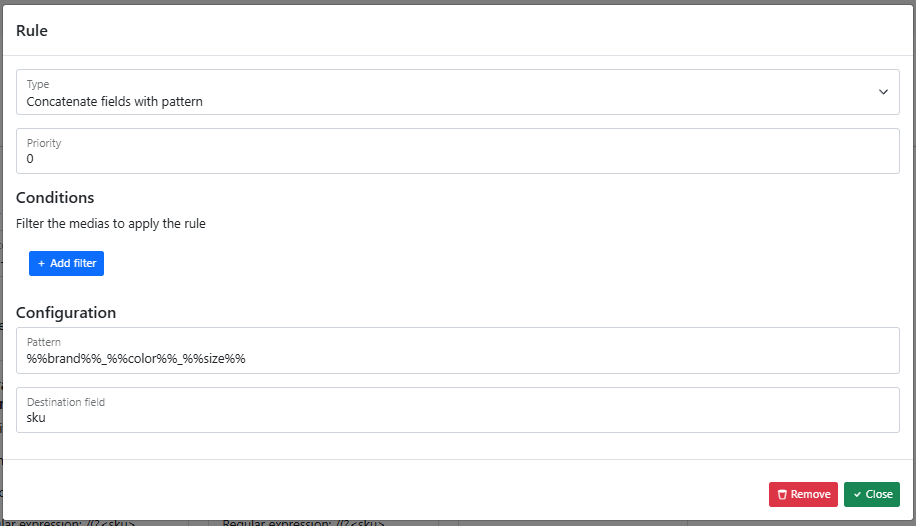
Simple configuration
The configuration for this type of rule is quite easy:
- define the priority (like for all other rules)
- the conditions (like for all other rules)
- the pattern for the concatenation
- and the destination
Let's look at the pattern. You can use static text and content of other metaproperties.
To use a metaproperty, you must "encapsulate" the code with some "%%". In our example, we will concatenate:
- the brand: %%brand%%
- the color: %%color%%
- the size: %%size%%
And we put some underscore between all properties:
%%brand%%%%color%%%%size%%
And we send this value in the metaproperty "sku" so we can use it in the other jobs.
Multi-Select Concatenation: Per-Value vs. Merged
Imagine your "color" field is a Multi-select with several values chosen.
You have two options for how concatenation handles multiple selected values: generating one result per value, or generating a single merged result.
Example Data
| Field | Value |
|---|---|
brand | Dataggo |
color | blue,white,red |
size | medium |
Option 1 — One concatenation per selected value (default behavior)
The pattern uses the standard syntax — no additional modifier needed:
%%brand%%_%%color%%_%%size%%
Result: one output row per selected color value:
Dataggo_blue_medium
Dataggo_white_medium
Dataggo_red_medium
Option 2 — Single merged concatenation (implode)
To merge all selected values into a single result, add the implode modifier to the multi-select field:
%%brand%%_%%color|implode%%_%%size%%
Result: all color values are joined into one output:
Dataggo_blue,white,red_medium
This is especially useful when generating human-readable text. For example:
The brand: %%brand%%, the colors: %%color|implode%%, the size: %%size%%
Result:
The brand: Dataggo, the colors: blue,white,red, the size: medium
Summary: Use the default syntax to expand a multi-select into multiple rows. Add
|implodeto collapse all selected values into a single, comma-separated string within one output.